A new lithium jump starter needs a full charge before its first use. One widely used manufacturer’s charging guide gives about 12 hours on a 0.5A charger, 6 hours on 1A, or 3 hours on 2A. After that first charge, later top-offs follow the same charge-time curve — a partially used unit typically takes less time than a full charge from empty.
- New lithium jump starters ship partially charged and need a full charge before you rely on them.
- Charge time depends on your charger’s output: roughly 12 hours at 0.5A, 6 hours at 1A, or 3 hours at 2A, based on one manufacturer’s published charging guide.
- A later recharge (after you’ve actually used the jump starter) follows the same amperage-based curve — it’s not a separate, faster “maintenance charge” time.
- These figures are for lithium-ion units. Lead-acid jump starters charge differently; follow that unit’s own manual instead of guessing.
- Letting the unit sit on a charger for more than about a week isn’t recommended — it can shorten battery life over time.
Why Does a Brand-New Jump Starter Need a Full Charge First?
Most lithium jump starters arrive from the factory with only a partial charge — enough to test the buttons and lights, but not necessarily enough for a real jump start. Manufacturer guidance for one widely sold lithium jump starter model explicitly instructs owners to fully charge the unit before the first use, rather than assuming the factory charge is sufficient.
This isn’t unique to one brand — it’s standard practice across rechargeable lithium devices, since a full first charge also lets the battery’s internal management circuitry calibrate properly against a true full-charge state.
How Long Does a Full Charge Actually Take?
The honest answer is: it depends on the output of the charger you plug in, not just on the jump starter itself. The table below uses the published charge-time figures from one widely used lithium jump starter’s manufacturer manual as a concrete, sourced example.
| Charger Output | Time to Full Charge | Battery Chemistry |
|---|---|---|
| 0.5A charger (standard USB) | About 12 hours | Lithium-ion |
| 1A charger | About 6 hours | Lithium-ion |
| 2A charger | About 3 hours | Lithium-ion |
| Lead-acid jump starter (any charger) | Varies by model — check your unit’s manual | Lead-acid |
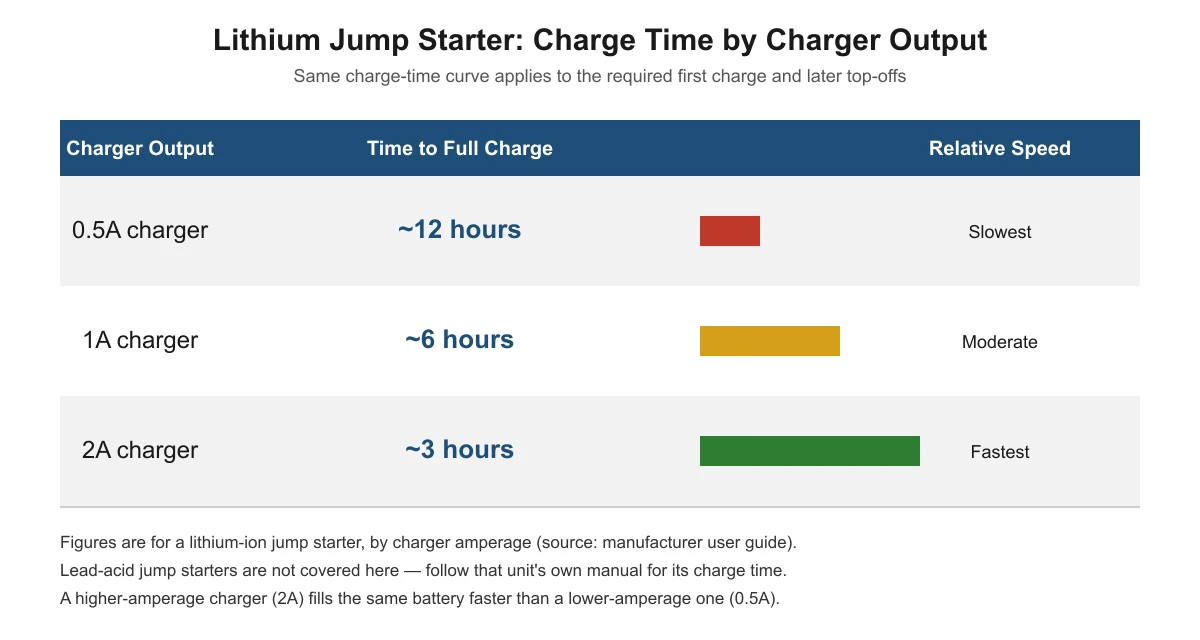
These exact hours come from one manufacturer’s user guide for a specific lithium jump starter model, not a universal standard across every brand. Your own unit’s manual may list slightly different numbers depending on its battery capacity, but the pattern — a slower charger takes roughly twice as long as one with twice the amperage — holds generally for lithium-ion charging.
Does Recharging After a Jump Start Take the Same Time?
The charge-time table above describes how long it takes to go from empty to full at a given charger output. A routine recharge after you’ve actually used the jump starter to start a car usually takes less time in practice, simply because the battery isn’t starting from zero — it only needs to replace the charge you used.
There isn’t a separate, officially published “maintenance charge” time distinct from the full-charge figures above; the same charge curve applies, scaled to how depleted the unit actually is. If you want to know more about how many starts you can expect from a single full charge before a recharge is needed, see how many jump starts you can get on one charge.
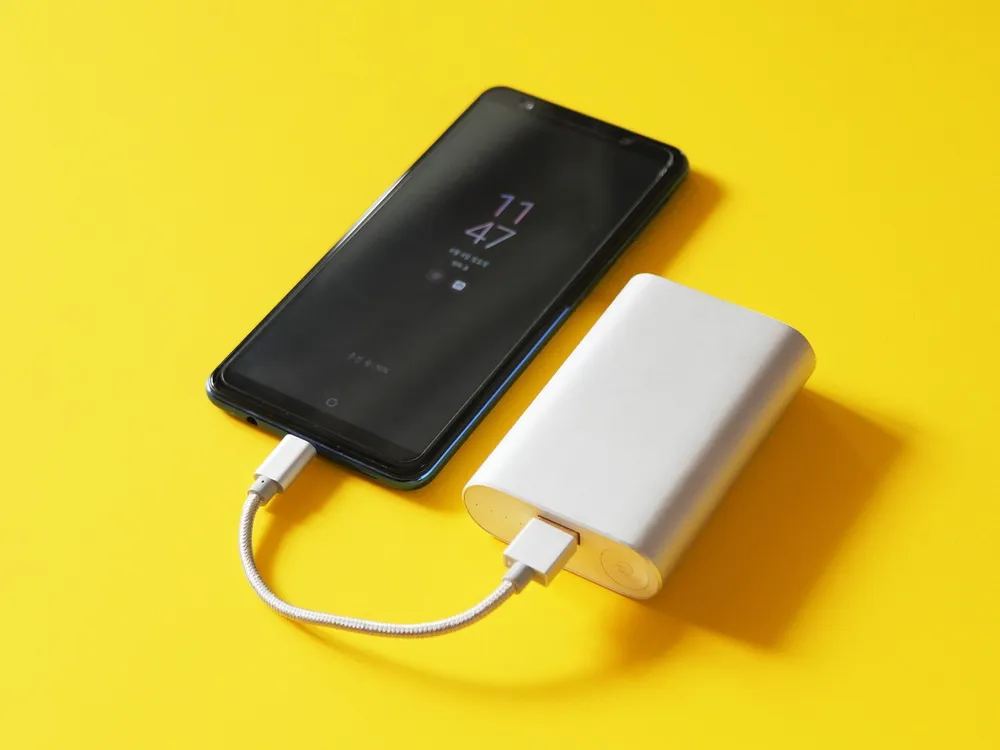
What About Lead-Acid Jump Starters?
Lead-acid jump starters use a different battery chemistry than the lithium-ion units the charge-time table above is based on, and no manufacturer source for a lead-acid-specific first-charge time turned up in our research. Rather than guess a number, the safest approach is to check the charging section of your specific lead-acid jump starter’s manual and follow it exactly — lead-acid batteries can be more sensitive to overcharging and undercharging than lithium cells, and their rated charge times vary more by model.
If you’re not sure which chemistry your jump starter uses, check the specification label on the unit or its manual. Lithium-ion units are usually lighter and smaller relative to their power output; lead-acid units are noticeably heavier for the same output.
How Can You Tell When It’s Actually Fully Charged?
Most lithium jump starters show charge status through an LED indicator — often a series of lights that fill up, or a light that changes color or stops blinking once full. The exact pattern varies by brand and model, so check your own unit’s manual for what “fully charged” looks like on your specific jump starter rather than assuming it matches another brand’s indicator scheme.
Once you’ve confirmed a full charge and you’re ready to actually use the unit, follow the correct connection order and safety steps in how to use a jump starter correctly before attempting a jump start.

Safety Notes for Charging a New Jump Starter
Charge a new jump starter indoors, at room temperature, on a hard, non-flammable surface, and don’t leave it charging unattended for long stretches. One manufacturer’s guidance specifically advises against leaving the unit on charge continuously for more than about a week at a time, noting that extended overcharging can shorten the battery’s usable life. Unplug it once it reads fully charged rather than leaving it connected indefinitely.
If you notice the unit becoming unusually warm while charging, swelling, or any damage to the charging cable, stop charging it and don’t attempt to use it until you’ve checked the manual’s troubleshooting section or contacted the manufacturer.
This matches general workplace guidance from the Occupational Safety and Health Administration (OSHA), which lists following the manufacturer’s instructions for the storage, use, charging, and maintenance of lithium-ion batteries — and training yourself to recognize a defective, damaged, or failing battery — among the basic ways to control lithium-ion battery hazards.
Keeping your jump starter properly charged between uses also helps avoid the capacity problems covered in why a jump starter won’t hold a charge — storing it at the wrong charge level for months at a time is one of the most common causes.
Frequently Asked Questions
Can I use a brand-new jump starter right out of the box without charging it first?
It may power on and show some charge, but manufacturer guidance for at least one widely sold model specifically instructs a full charge before first use rather than relying on the factory charge level. Charge it fully before you need it for a real emergency.
How do I know when my jump starter is fully charged?
Check the LED indicator pattern described in your unit’s manual — most lithium jump starters show a fill-up pattern of lights or a light that changes color or stops blinking once charging is complete. The exact pattern differs by brand and model.
Will a faster charger damage my jump starter’s battery?
Using a charger within the input rating your jump starter’s manual specifies is the safe approach — it simply charges faster, following the same curve shown in the table above. Using a charger far outside the specified input rating isn’t something manufacturer guidance supports, so stick to what your manual recommends.
What if my jump starter uses a lead-acid battery instead of lithium?
Lead-acid jump starters charge on a different timeline than lithium units, and no sourced first-charge figure for lead-acid models was available for this guide. Check your specific unit’s manual for its charging instructions rather than assuming the lithium figures above apply.
How often should I recharge my jump starter if I’m not using it often?
This depends on your model’s storage recommendations. For more on ideal storage charge levels and recharge intervals, see why a jump starter won’t hold a charge, which covers the maintenance-charge guidance in more detail.
Sources
- NOCO GB40 Official User Guide (charge-time-by-amperage table; instruction to fully charge before first use; guidance against charging continuously for more than about a week)
- OSHA, Lithium-ion Battery Safety — Control Measures (following manufacturer charging/maintenance instructions; recognizing a defective, damaged, or failing battery)
By jumpstarterguides.com Editorial Team. Last updated: November 13, 2026.